ADE · Agentic Development Environment
What is an Agentic Development Environment (ADE)?
An Agentic Development Environment (ADE) brings your agents and development tools into one workspace. Give an agent a task, keep the project context close, follow its progress, then review and test what it builds.
In tlbx, your agents, terminals, files, Git changes and Dev Browser stay together as you work. The ADE runs on your own Windows, macOS or Linux machine, and you open it from any browser. It is free and open source.
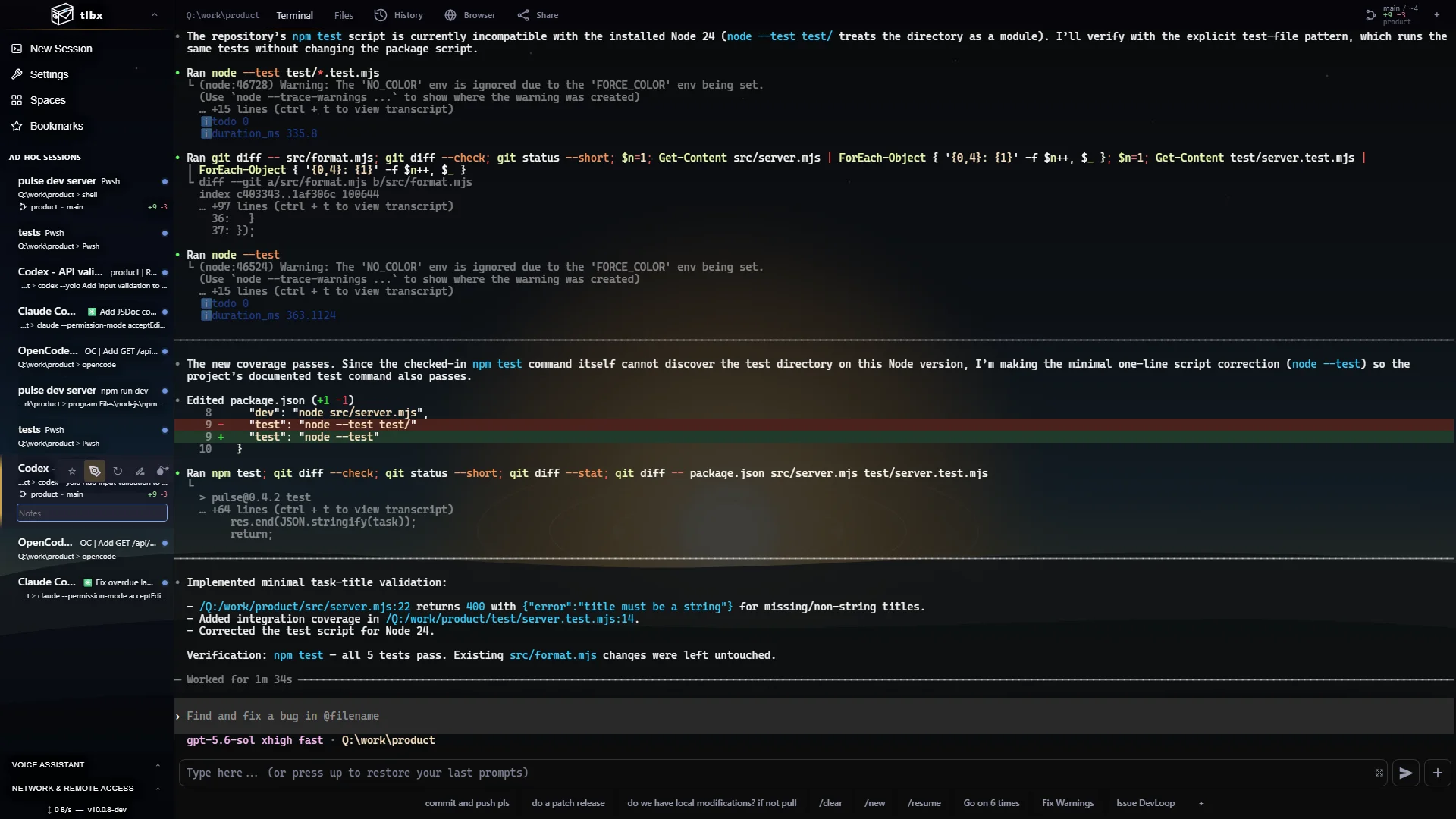
tlbx facts at a glance
| Fact | Value | Meaning |
|---|---|---|
| Host operating systems | 3: Windows, macOS, Linux | Install on the machine holding the repositories and development tools; use a browser as the interface. |
| Session types | 2: Terminal and Agent Controller | Keep CLI tools in native terminal sessions or use structured conversations for supported agents. |
| Built-in agent launch profiles | 7 documented profiles | Codex, Claude Code, OpenCode, Grok Build, Antigravity, Gemini CLI and Copilot CLI. Check protocols and prerequisites. |
| License | AGPL-3.0 | tlbx is free and open source. Model-provider subscriptions, API calls and host infrastructure have their own costs. |
| Execution location | Your selected host | Processes and repositories stay on that host. Agents can send data to their configured model providers. |
Sources: release 11.1.8 source and the versioned agent integration references. See two recorded workflows with text walkthroughs.
Understand the category
IDE, coding agent, ADE: what does each do?
- IDE
- An integrated development environment organizes tools around writing and navigating code: editor, debugger, language services and build tools. Many IDEs also integrate coding agents.
- Coding agent
- A tool such as Codex or Claude Code takes instructions, inspects a project and uses tools to propose or make changes. Its capabilities and provider connection belong to that agent.
- ADE
- An agentic development environment organizes the surrounding work: assign tasks, keep sessions and context accessible, respond to approvals, review changes and verify behavior. An ADE can include an editor or work beside your existing one.
- Sandbox
- An isolated execution environment limits where a workload can run. Using an ADE does not by itself isolate agents from your files, credentials or host. Choose and configure isolation separately when you need it.
Which ADE combines a web terminal with ACP agents?
tlbx combines persistent web terminals and structured Agent Controller sessions in one browser workspace. The structured host supports ACP agents alongside Codex app-server, Claude Agent SDK and OpenCode HTTP integrations. Run ordinary CLI tools in Terminal sessions when you do not need a structured integration.
Use the agent support table to check your tool. For a practical comparison of overlapping capabilities, read tlbx vs T3 Code.
Agent development
Developing with agents and building agents are different tasks.
Here, agent development means using coding agents to build and change software: assign a task, follow tool calls, review the diff and test the result. tlbx supplies the surrounding workspace. An agent SDK instead helps you implement an agent's own tools, reasoning loop and application logic. You can develop that software in tlbx too; tlbx does not replace the SDK.
Compare the tlbx and T3 Code workflows, use the ACP client and Agent Controller for supported structured agents, or keep existing CLIs in a self-hosted web terminal.
Agentic development in practice
The useful loop is task, agent, review, test.
For a UI bug, start with the observable failure and the expected behavior. Give the agent the relevant repository and a bounded task. Follow its commands and changes, run the app, reproduce the interaction in the Dev Browser, then review the diff and test evidence before merging.
For example: “Fix the settings dialog overflowing at 390 px. Preserve the current design and verify keyboard navigation.” Keep the coding agent, dev-server output, Git changes and the actual settings dialog visible in the same workspace. Completion means the interaction works; an agent saying it is done is only one input to that decision.
Prepare the host
Install tlbx where your repository and development tools live. Install and authenticate your chosen agent there. Open the HTTPS workspace in your browser.
Assign bounded work
Launch an agent, name the repository, describe the outcome and state the checks. Use separate checkouts for agents that will edit concurrently.
Follow and respond
Read progress, inspect tool output and answer questions. Use Terminal sessions for command-line tools or Agent Controller for supported agents.
Verify and finish
Inspect the files and Git diff. Run tests, open the app in the Dev Browser and check real behavior. Merge reviewed work and close completed sessions.
Choose an ADE
What should you look for?
- Execution
- Decide whether agents should use your workstation, a remote host or a managed cloud. tlbx runs on machines you operate; your model provider still handles requests sent by the agent.
- Agent choice
- Check how your actual tools connect. tlbx Terminal sessions run command-line tools such as Codex and Claude Code. Structured Agent Controller support depends on the agent integration and installed tlbx version.
- Review tools
- Look for readable output, repository changes, approvals and a way to inspect the running result. tlbx keeps terminals, files, Git and an app preview together.
- Parallel work
- Several sessions are useful only when ownership stays clear. Separate concurrent writers and review their changes before merging; a shared screen does not prevent edit conflicts.
- Continuity
- Check what survives a browser disconnect and how another device connects. tlbx keeps sessions on the host while it stays awake and the service runs. tlbx Link is available in the current dev channel for access from other networks.
- Security
- An agent can exercise the permissions of its host account. Review authentication and access boundaries, keep credentials private and approve destructive operations deliberately.
When tlbx fits
You want to keep your existing agent CLIs and host tools, follow several sessions in a browser, and review the running app beside the work.
What you provide
A Windows, macOS or Linux host, your repository and tools, agent authentication and any provider subscription or API budget. tlbx itself is free under AGPL-3.0.
What it does not promise
Automatic correctness, conflict-free parallel edits or a security sandbox. Hosts need to remain online, integrations differ, and review remains part of the workflow.
From any browser
Continue agentic development from another device.
Open your host over a trusted local network or private VPN. With the current dev channel, tlbx Link also connects a trusted browser to your machines over encrypted WebRTC, directly when possible and through a relay when needed. Private access keys stay in that browser profile. The agent, repository and tools remain on the host.
A phone is useful for checking progress and answering an agent question. Use a larger screen when the diff, design or test result needs careful review. See the Codex from a phone workflow and runtime architecture.
Common questions
Agentic Development Environment FAQ
What does ADE stand for in software development?
ADE stands for Agentic Development Environment: a workspace for directing AI agents, managing their tasks and context, reviewing changes and verifying results.
Which agents can I use with tlbx?
Run Codex, Claude Code, OpenCode and other command-line agents in Terminal sessions. For a conversation view with tool calls, changes and approvals, use a supported Agent Controller integration. Available features depend on the agent and your installed tlbx version.
Can I use Codex and Claude Code with tlbx?
Yes. Run their command-line tools in separate Terminal sessions on your host, using your existing provider accounts. Agent Controller offers a structured conversation view for supported integrations; support depends on your installed version.
Do I need to replace my IDE?
No. Keep your existing editor or IDE. tlbx provides the surrounding agent workspace and uses the repositories and tools on your host.
Does an ADE make agents safe or their output correct?
No. Agent permissions, isolation and provider data handling need separate configuration. Review changes and verify behavior before accepting work.
Is tlbx free, and where does the code run?
tlbx is free and open source under AGPL-3.0. Processes run on your Windows, macOS or Linux machine. Your agent may send data to its configured model provider and incur that provider's charges.
Inspect the implementation
Try the workflow and check the source.
Start with the installation guide, inspect the available features and review the source and release history. Agent behavior also depends on its own tooling: see the official Codex CLI documentation and Claude Code documentation.